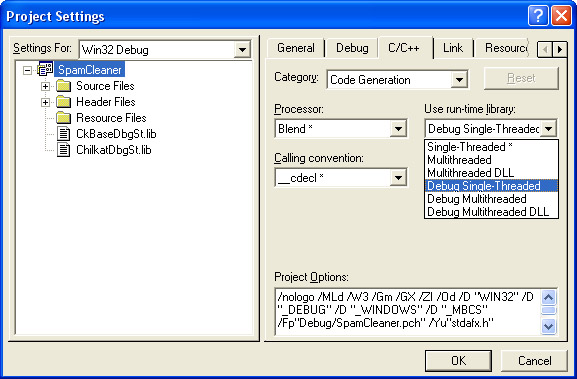
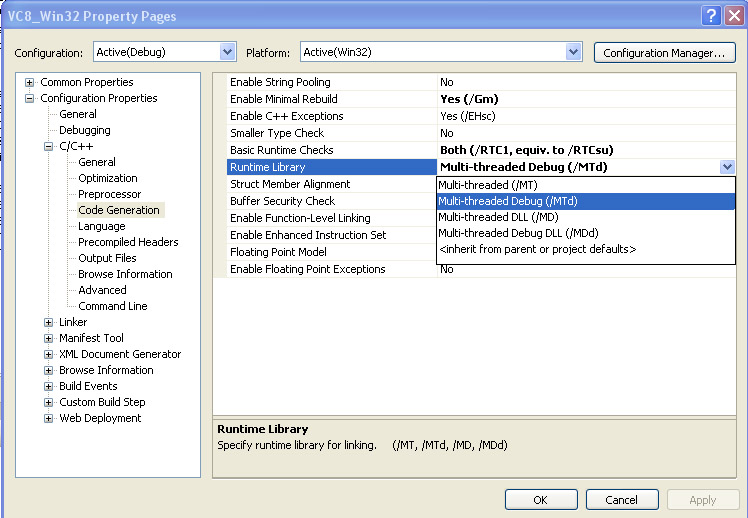
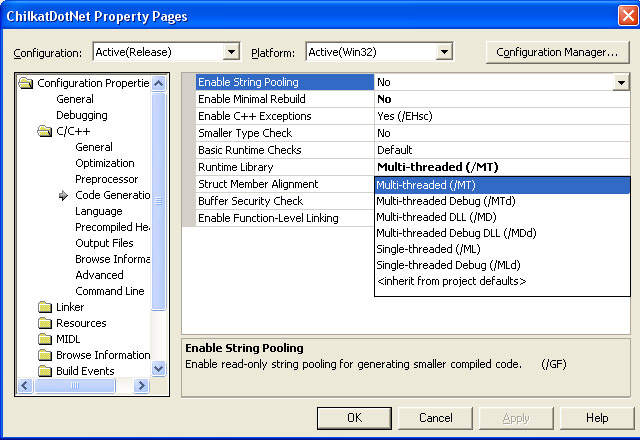
When linking with a Chilkat C++ library, you must choose the .lib that matches your project’s “code generation” property setting.
For example, in VC++ 8.0, these are the Chilkat .lib’s:
ChilkatDbg.lib
ChilkatDbgDll.lib
ChilkatRel.lib
ChilkatRelDll.lib
If “Dll” is in the library name, it means that you are *not* statically linking with the C runtime libs. Just because your project produces a .dll does not mean you’ll use the .lib with “DLL” in the name. The choice depends on the “code generation” project setting for each build.
I hope you can figure out the difference between “Dbg” and “Rel” without me explicitly stating it…
Here are screenshots of the VC++ 6.0, VC++ 7.0, and VC++ 8.0 code generation property pages:
ALSO: The names of the libs and the information shown here for VC++ 8.0 are identical for VC++ 9.0 and VC++ 10.0
VC++ 8.0
VC++ 7.0
VC++ 6.0